
12 Home Office Cable Management Ideas to Hide Every Cord
Count the cords on a typical desk: monitor power, laptop charger, lamp, phone charger, speakers or headphones, a webcam, maybe a second screen and a desk fan. Nine cables, all visible, all tangling. These home office cable management ideas hide every one of them with a simple order of operations: cut the count, put the power strip off the floor and out of sight, route everything in bundled runs, and label both ends so the system survives its first unplugging. You need about an hour, $25–50 of basic supplies, and no tools beyond scissors and adhesive clips. Safety first throughout: never pinch cables in drawer slides, never cover a power strip with fabric, and leave air space around chargers that run warm.

Step Zero: The Cable Audit (Do Not Skip This)
Unplug everything and lay it out. In most desks, 2–3 cables are dead weight — a charger for a phone you replaced, a cable for a printer you moved. Remove them to a labeled spares box. Group what remains by destination: things that stay on the desk (monitor, lamp), things that charge (laptop, phone), and things that live under the desk (tower PC, speakers). As cable guides from makers like Anker note, managing fewer cables well beats managing all of them badly — every idea below gets easier for each cable you retire.
12 Home Office Cable Management Ideas
1. Mount the Power Strip Under the Desk
The single biggest visual win. Screw or strong-adhesive-mount the power strip to the underside of the desktop, toward the back, or drop it into the tray in idea 2. Every device plugs in above the floor, excess cord coils under the desk instead of pooling by your feet, and exactly one cable — the strip's own — travels to the wall outlet. Use a strip with a flat plug so furniture can sit close to the wall.
2. Add an Under-Desk Cable Tray
A wire tray (typically 12–17 inches long, clamped or screwed under the back edge of the desk) holds the power strip, laptop power bricks and all the slack. Clamp-on versions are renter-friendly and fit desks up to about 2.5 inches thick. Route each device cable down into the tray, not across the desktop: monitor and lamp cords should drop behind the desk within 6 inches of the device.
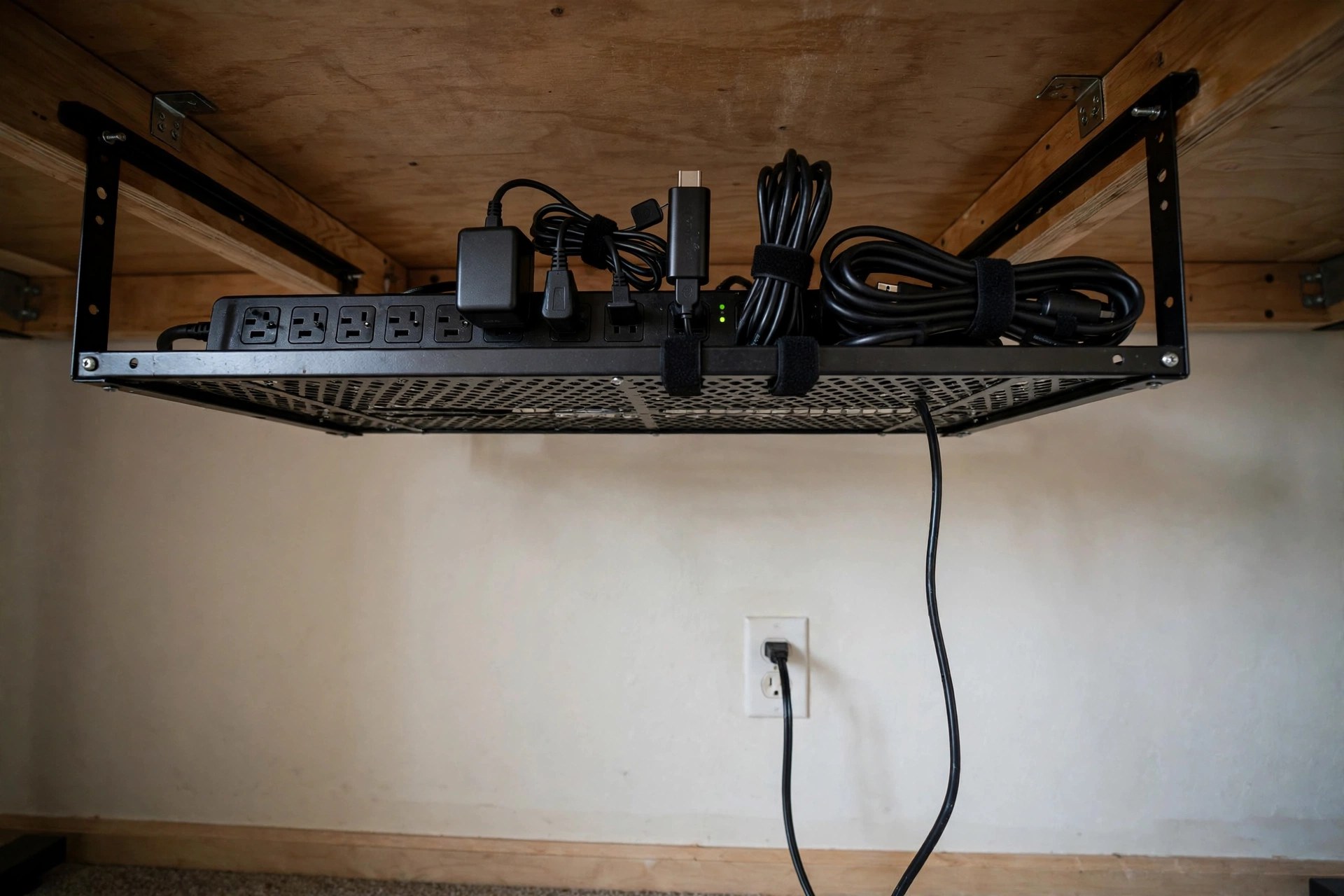
3. Box the Strip if It Must Stay on the Floor
No tray, no problem: a cable management box (about 12–16 inches long, with slots at both ends and ventilation on top) hides a floor power strip and its coil of excess in seconds. Keep the lid unlatched for airflow and never throw a rug over it. Boxes work especially well beside a desk where a tray will not fit, and next to entertainment furniture.
4. Sleeve Every Vertical Drop
Wherever cables run from desk height to the floor — to the outlet, to a PC tower — bundle them into one neoprene or braided sleeve (sold in 5–10 foot lengths, cut to fit). Three loose cables read as clutter; one sleeved run reads as a design line. Sleeves with a zipper are easier to reopen than split-loom tubing when you change a device.
5. Clip the Runs Along Edges and Baseboards
Adhesive cable clips every 12–18 inches along the desk's back edge, underside or the baseboard keep runs straight, off the floor and out of the vacuum's path. DIY cable roundups like Autonomous suggest the same approach for wall runs, including low-tack clips on painted walls so renters can remove them cleanly. Plan the route before sticking: clips are annoying to move.
6. Use a Desk Grommet or Monitor-Arm Channel
If your desk has a grommet hole (usually 2–2.4 inches), use it: cables pass through the surface instead of spilling over the back edge. No hole? Many monitor arms have a cable channel in the arm itself — clip the monitor's power and video cables into it so they travel with the screen and disappear behind the pole.

7. Turn a Drawer Into a Charging Station
Run a small power strip into a desk drawer (through an existing gap or a hole drilled at the back, only if the desk is yours to drill) and charge phones, earbuds and a tablet inside it. Devices charge out of sight, off the work surface, and the drawer still closes because cables exit at the back. Leave the drawer cracked open during fast charging — batteries and bricks both generate heat.
8. Replace Velcro Chaos With Velcro, Done Right
Cable ties are permanent; your setup is not. Use reusable hook-and-loop ties every 8–12 inches along a bundle, snug but not crushing — a crushed cable is a damaged cable. Coil excess length into a flat loop inside the tray rather than a tight circle, which stresses the conductors. Color-code ties by run (desk, floor, charging) for instant tracing.
9. Go Wireless Where It Actually Helps
A wireless keyboard and mouse delete two of the most visible, most moved cables instantly. A charging pad deletes the daily phone cable from the desktop. Do not chase total wireless — monitor power and ethernet are fine wired and hidden — chase the cables you see and touch every day. This pairs naturally with the calm-desktop approach in our home office desk styling ideas.
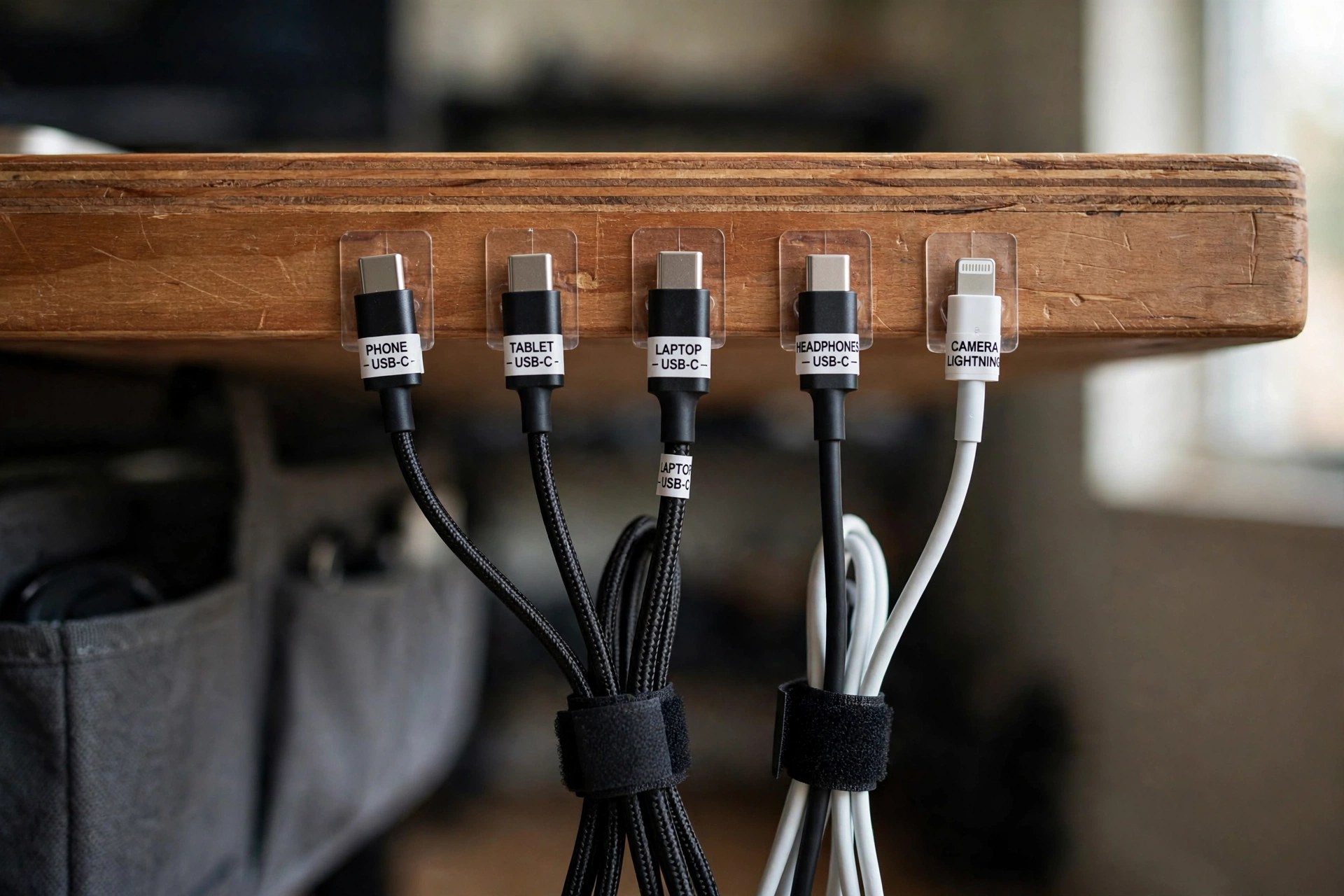
10. Label Both Ends of Everything
A $5 label maker, masking-tape flags, or colored tags at both the device end and the strip end of every cable. The payoff comes the day something must be unplugged: no more guessing which of four identical black cables powers the monitor while a meeting starts. Label the power bricks too — they all look alike in the tray.
11. Cover the Floor Crossing Safely
If a run must cross a walkway — to a printer stand, a fan, a second outlet — use a low-profile rubber floor cord cover, never a loose cable under a rug (a trip hazard and a wear point). Better still, reroute along the wall: two extra feet of cable along a baseboard beats one foot across the floor every time. The storage pieces in our small home office storage ideas can hide a baseboard run behind a low shelf.
12. Hang a Home for Spares
Spare cables cause half the visible mess because they have nowhere to live. Mount a small hook rail or hanging rack near the desk — inside a cabinet door works — and coil each spare once, tagged with its label. When a cable is not in the rack, it is in use or in the donation box. Finish the wall above the now-clean desk with something worth looking at from our home office wall decor ideas, and browse more setups under the Home Office label.
Prices and buying specs for the kit
Power strip (idea 1). Buy 6–8 outlets — count your devices and add two spares — with surge protection rated 1,000 joules or higher, a flat plug, and a cord of 4–6 feet (longer cords just add coil to hide). $20–$35; replace surge strips every 3–5 years or after a major surge event, because the protection wears out silently. Cable tray (idea 2): $15–$30 for the 12–17-inch wire tray; desks thicker than the clamp's roughly 2.5-inch limit need the screw-mount version. Cable box (idea 3): $16–$28; measure your strip first — an 8-outlet strip is about 12–13 inches long and needs the box's larger size, plus the bricks' height (about 2–2.5 inches of interior clearance). Sleeves (idea 4): $8–$14 for a 10-ft zippered sleeve of about ¾–1-inch diameter, which swallows 3–5 standard cables; fatter bundles need the 1.5-inch size. Clips (idea 5): $6–$10 for a 20-pack — at the 12–18-inch spacing above, one pack covers a desk run and a baseboard run. Velcro ties (idea 8): $7–$12 for a 50-pack of 6–8-inch ties. Grommet (idea 6): if you are drilling your own, the hole saw is 2–2⅜ inches and the grommet kit is $8–$12. Charging-drawer strip (idea 7): a compact 2–3-outlet strip or a 4-port USB charger (65W GaN models, $25–$40, charge a laptop and phone together) fits a drawer better than a full strip. Labels (idea 10): tape flags $5, or a basic label maker $20–$30. Floor cord cover (idea 11): $12–$20 for a 5-ft low-profile rubber cover. The whole system: strip + tray + sleeve + clips + ties lands at $55–$95, which is the full twelve-idea setup minus the wireless gear.
The 10-Minute Quarterly Reset
Setups drift: a borrowed charger here, a new lamp there. Every few months, re-run the audit — remove the dead, re-sleeve the drops, check labels match. Ten minutes keeps the desk you see in the photo at the top of this article from quietly reverting to a nest.


Comments
Post a Comment